
|
|
posted on April 30, 2010 06:56
Configure Outlook to use port 587 for sending email In order to change your port 25 settings to port 587 in Outlook, you must do the following:
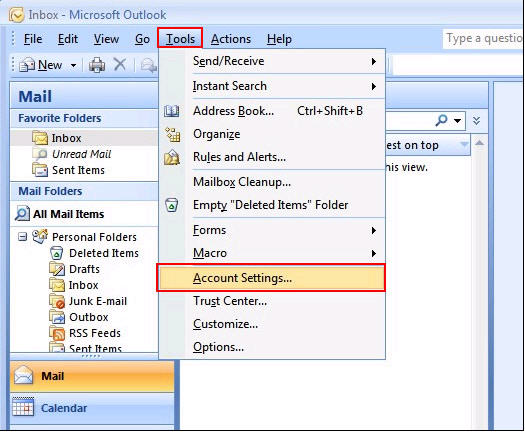
- Open your Outlook, select the Tools menu and from the drop-down list select Account Settings.
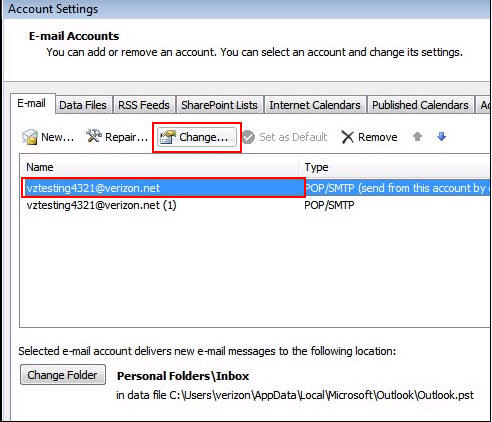
- The Account Settings window will open displaying the Email tab. Click to highlight your Verizon account and then select Change.
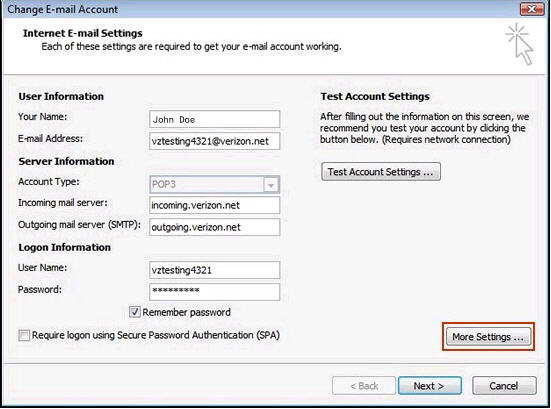
- From the Change Email Settings screen, select More Settings from the lower right-hand portion of the window.
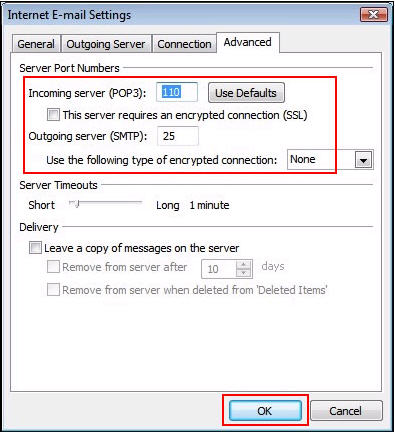
- From the Internet Email Settings window, select the Advanced tab.
- From the Advanced tab, review the area underneath Server Port Numbers. In the Outgoing server (SMTP) field enter the number: 587.
Once you are finished, select OK.
After you have completed the above steps for Outlook, you will be configured to use port 587 to send email with much greater safety and protection from spam and viruses
There are currently no comments, be the first to post one!